

KolApp vs Monday.com
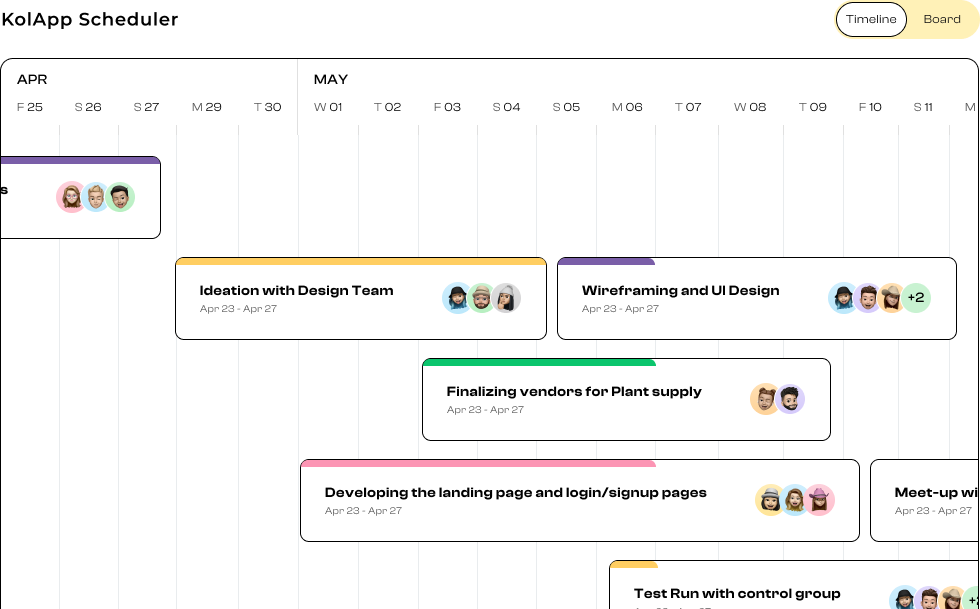
In today’s fast-paced digital landscape, teams juggle multiple tools, workflows, and deadlines — often leading to scattered communication and missed opportunities. That’s where KolApp steps in.
KolApp isn’t just another project management platform; it’s a comprehensive work management ecosystem designed to unify your team’s projects, people, and performance under one intuitive interface. We wanted to compare it against an industry best, Monday.com and really give our take on why we think, KolApp, might be the best tool for project management in 2025.
KolApp
- KolApp is a project and portfolio management solution that emphasizes simplicity, visibility, and overall efficiency in managing multiple projects.
- It markets itself as bridging the gap between agile/modern tools and traditional project oversight — letting you see all your workstreams in one place.
- Feature set includes Kanban boards, timelines, dashboards/analytics, project automation, resource management, budget tracking, scheduling, and custom integrations.
Monday.com
- Monday.com is a more “work OS” / project management platform that lets teams build custom workflows, track tasks, visualize progress, automate processes, and integrate with external tools.
- It emphasizes visual interfaces (boards, timelines, dashboards), and flexibility.
- Offers templates, integrations, and automation capabilities, making it suitable for different use cases (marketing, IT, operations, etc.).
Feature & Capability Comparison
|
Feature / Capability |
KolApp |
Monday.com |
|
Automation & Workflow Logic |
Offers project automation and custom automations (AI & workflow logic) as part of its core. |
Strong automation builder (if/then logic, triggers, etc. Requires set up). |
|
Views / Visualization |
Kanban, GANTT, dashboards, analytics, scheduler. |
Many view types (Kanban, calendar, charts, timeline, dashboards) and strong UI focus. |
|
Resource / Budget Tracking |
Has built-in budget management, resource allocation & scheduling capabilities. |
Has some resource and workload visibility, but advanced financial and budget tracking is less core. |
|
Scalability / Portfolio Management |
Designed with Project Portfolio Management (PPM) in mind (to manage multiple projects). |
Scales well, but the management of many large complex projects across portfolios may require more custom setup and expensive. |
|
Ease of Use / Learning Curve |
User-friendly UI with help guides and good documentation. |
Generally praised for intuitive UI and relatively shallow learning curve (for basic functions). |
|
Project Planning |
Fully built-in Gantt for each project with full scheduling capabilities. |
Limited timeline view of tasks. Not a Gantt. |
|
Pricing & Cost |
Starts at around $7/user/month per user. Quite affordable even for enterprise packages. |
Pricing is tiered, per-user, and many advanced features are locked in higher tiers. |
Pros & Cons
KolApp — Pros
- Portfolio-level oversight
Because it emphasizes PPM, KolApp lets you see key insights across many projects, helping with resource allocation and cross-project visibility as well as see project progress, risks, updates, and even can give daily email reports of metrics. - Built-in budget & resource tools
If your projects demand tight financial management, KolApp offers these as core features, which fewer general PM tools do. You can track budgets, related expenses, define categories of expenses and even see budgets across multiple projects. - Resource Management Scheduling capabilities and resource management lets you really track workload across the company.
- Modern features (automation, analytics, Gantt)
Offers features out of the box and gets you going the moment you sign up.
Monday.com — Pros
- Mature, proven platform
Large user base, many third-party tools, and a strong ecosystem of templates, integrations, extensions, and community knowledge. - Highly visual, flexible UI
Very many views (boards, timelines, dashboards) and a polished interface that many users find intuitive. - Strong automation & workflow logic
The automation engine and triggers are robust, which can offload tedious tasks. - Template library & onboarding tools
Because it’s widely used, there are many templates, tutorials, learning resources, and community support. - Scalable & customizable
You can build custom workflows, dashboards, and extend functionality as your needs grow.
KolApp — Cons
- Integrations
Many integrations with common 3rd party tools is still not as mature. - Mobile
No mobile app makes it more challenging to manage work on the go. - Limitations in financial tracking / time & expense
Not a true financial system but has financial project tracking capabilities. - Not as big as Monday.com
Still growing as a platform, not as popular as Monday.com - Some missing “depth” features
Some features such as workflows still missing key actions required in everyday scenarios.
Monday.com — Cons
- Cost / pricing structure
Many of the more advanced or useful features are locked behind higher-priced tiers; per-user pricing can add up. - Overwhelm & feature bloat
With so many integrations, automation options, and views, new users can get overwhelmed. - Limitations in financial tracking / time & expense
Some users find time/expense tracking and cost-tracking per task weaker or cumbersome in Monday.com. - Support responsiveness issues
Given its scale, some users report delays or impersonal responses when support is needed. - Some missing “depth” features
In very complex or enterprise-level project scenarios (resource leveling, deeply nested dependency structures), you might need to patch in or customize heavily.
Which Is Better for Different Use Cases
- If your team is smaller and are looking for a most cost-affordable product — KolApp might give you exactly what you need, without losing out on most of the features monday.com has.
- If your projects are highly financial, resource-intensive, and demand portfolio-level tracking with budgets, KolApp’s built-in strengths may help you more directly.
- If your team wants a mature, widely supported tool with many integrations out-of-the-box, a strong community, and many templates and learning resources — Monday.com is safer and more proven.
- For fast adoption, visual appeal, ease of onboarding across non-technical users, and having “less friction” in setup and user acceptance — KolApp likely has an edge.